French
  English
  Arabic
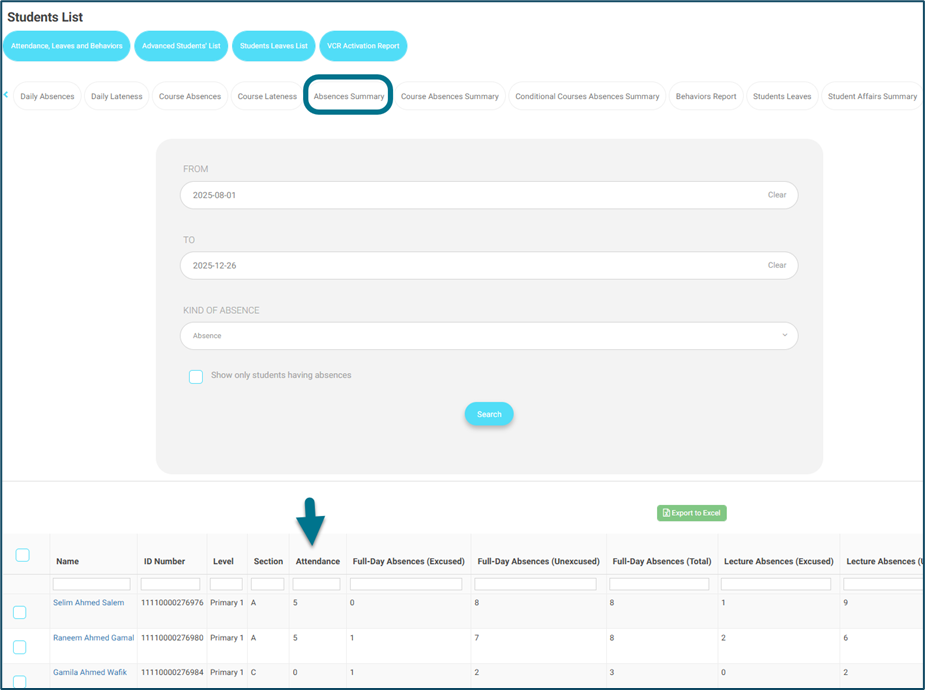
 -Showing both attendant and absent summary report
As a floor supervisor, adviser, school leader, manager, student affairs officer, school owner, and admin, I want to be able to view all students in the absences summary report, not only students who have absences.
Access Path:
On the following accounts:
- Floor supervisor & Student Affairs Officer — Side menu — Students list — Absences Summary.
- Adviser — Side menu — Students List — Daily Absences — Absences Summary.
- Manager — Side menu — Students — Absences and Behaviors report tab — Absences Summary.
- School Leader & School Owner — Side menu — Students — Absences and Behaviors report tab — Absences Summary.
How to Use:
Note: this will be applied for both types of absences shown in the report (absences and lateness).
This report should show all students, not only the ones with absences.
Pagination will be added because of the large number of students.
But Exporting will not be affected, all students on all pages will be exported.