
 English
  Arabic
  French
 Clinic Enhancements #
Aim:
This improvement includes some clinic module enhancements.
•Chronic Disease indicator should appear in the home page where there are clinic transfer requests.
•On the diagnoses page, clinic officer will be able to filter using the diagnosis category and to view the medical record.
•Clinic officer will be able to attach files in the medical record.
Access Path & How to Use:
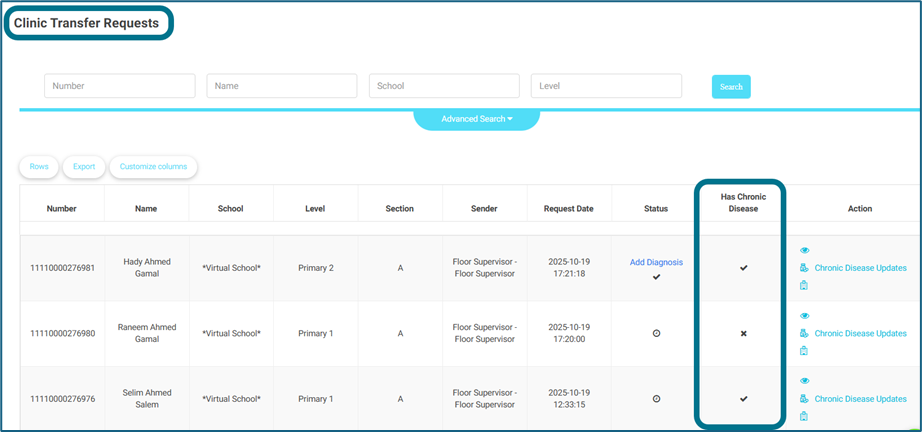
A-Chronic Disease appearing on the clinic transfer requests page
On the clinic transfer requests page, existing on the:
- Clinic officer’s account — Home page.
- Admin’s account — side menu — clinic — medical records — clinic transfer requests.
- Manager, Adviser, Floor supervisor, School leader & Student affairs officer — side menu — clinic transfer requests.
•A new column called “Has Chronic Disease” will be added.
•Note: chronic diseases are added by the clinic officer through the side menu — medical records — add/edit medical record — chronic disease field.
B-Showing Diagnose Category on The Diagnoses List
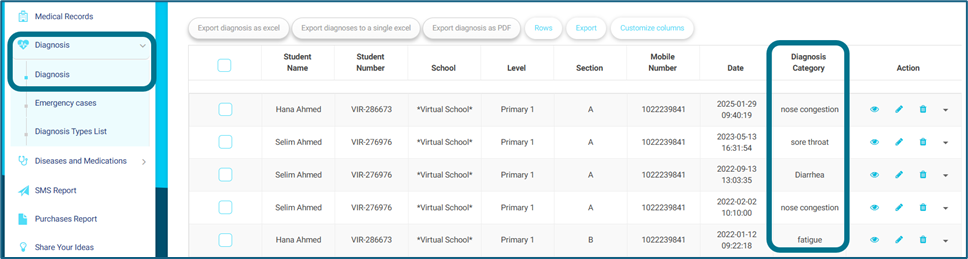
•On the clinic officer’s account — side menu — diagnoses –– diagnoses.
•A new column will be added on the table called “Diagnose Category”.
•It will return the diagnose category entered by the clinic officer through home page — view for any clinic transfer request — approve — adding diagnose page.
C-Uploading attachments in the medical record
•The clinic officer should be able to upload attachments to the medical records.
•So, on the:
- Clinic officer’s account — side menu — medical records — edit.
- Clinic officer & Guardian accounts — side menu — students — add medical record for any student.
- At the bottom of the page, a new field called “Attach File” will be added.
- Files that can be uploaded will be of the following Types: PDF, Word, Excel, JPG, JPEG, and PPT & can upload more than one attachment.




