
 English
  Arabic
  French
 A tree is nothing without its roots; similarly, education without exams. Exams help teachers understand their students’ mental capacity and shortcomings. Moreover, exams help the students think about how it should be done. It does not only open the doors for a better personality, but it also improves skills of mathematical reasoning, communication, logistics, science, and the expressive nature of the subject, which will help the platform add the ‘ability, subtract the ‘failure’ and multiply their ‘success’.
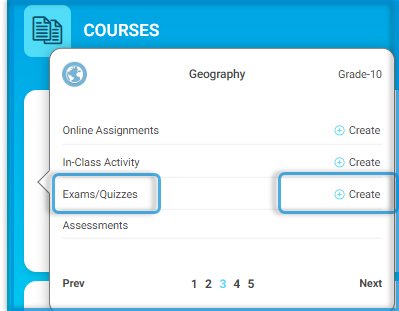
You can access all your exams directly from the third tap of your course, where you can add or manage your exams.
issuing Certificate After Passing Exam #
The Issuing Certificate After Passing Exam service enables teachers to design, alter, and award certificates to students depending on exam results. It allows for individualized recognition, easy template selection, and adjustable issuance conditions—either to all test takers or only those who pass—all of which assist to motivate students and successfully document their achievements.
Main Features:
- Motivating students through personalized recognition
- Enabling teachers to customize certificates based on the type of achievement or student category
- Promoting academic and behavioral excellence in a targeted manner
- Easy template design to align with the objectives of each class
- Documenting student achievements in an organized and appealing way
- Strengthening the student-teacher relationship through meaningful appreciation
- Easy tracking of certificates awarded for each class and each objective
To use this screen efficiently, do as follows:
- On the main page, click Courses.
- Click the Create button next to the Exam/Quizzes title.
- Select Certificate Template.
- You should assign the certificate to sections. Choose the section(s) (e.g., “2 B”) to which this certificate will apply.
- Add Multiple Certificates (Optional)
- Click Add Sections to assign different certificates to other sections. For each added section:
- Select a different certificate template.
- Assign it to the appropriate section.
- Choose additional options as needed.
- Choose one of the following options at the bottom for the issuance condition:
- Issue certificates for all: Everyone who takes the test will get a certificate.
- Issue certificates for passed only: Only those who meet the passing percentage will receive a certificate.


