
 English
  Arabic
  French
 Absences Summary Report: Enhancing Parent Contact & Absence Tracking #
This update optimizes the Absences Summary Report by displaying parent mobile numbers and unexcused absence percentages directly within the data table. By offering real-time visibility into student attendance statistics and primary contact details, the system enables floor supervisors to facilitate immediate parent outreach and monitor attendance trends efficiently.
This feature is available to Floor Supervisors.
Reviewing Attendance and Contact Details #
To monitor student absence metrics and access parent contact numbers, follow these steps:
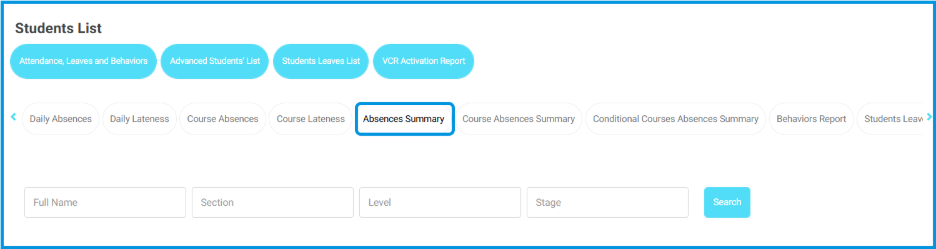
- Navigate to Students List page and select the Absences Summary tab.
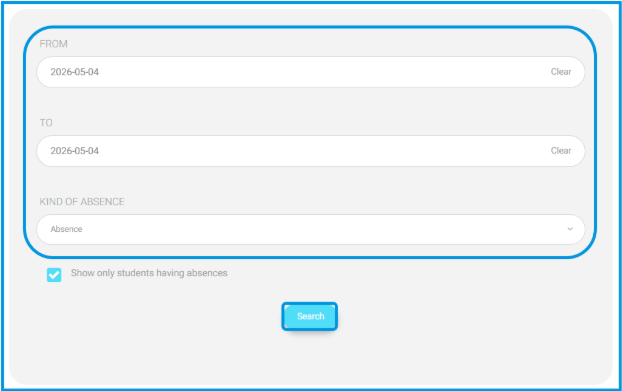
- Use the date filters (From and To) and select the Kind of Absence from the dropdown menu.
- Click Search to generate the report.
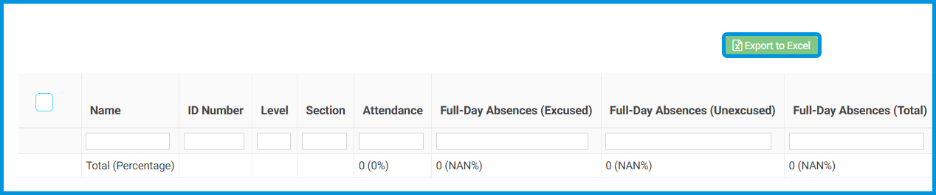
- In the generated table, locate the newly added columns:
- Parents Mobile Numbers
- Unexcused Absence %
- Review the information provided in each column:
- Parents Mobile Numbers: Displays the primary mobile number for the student’s guardian. If you hover your cursor over the number, the system will display the specific relationship type (e.g., Father, Mother).
- Unexcused Absence %: Shows the student’s unexcused absence rate calculated for the selected date range.

- To extract this data for administrative use, click Export to download an Excel sheet that mirrors the on-screen information.
Note: The unexcused absence percentage is automatically calculated using the following formula:
(Unexcused Absence Days ÷ Total Working Days) × 100
If the student has no unexcused absences during the selected period, the column will display 0%.


