English
  Arabic
  French
 Family Payment #
Aim:
As a guardian, I want to view and manage tuition invoices for all my children (if they are in the same school) from one consolidated page, so that I can filter, review due and paid amounts, and proceed with payment quickly and conveniently.
Access Path:
- Guardian logs in – Clicks on Payments — Family Payment.
- System checks: Are all children from the same school? ✅ Yes.
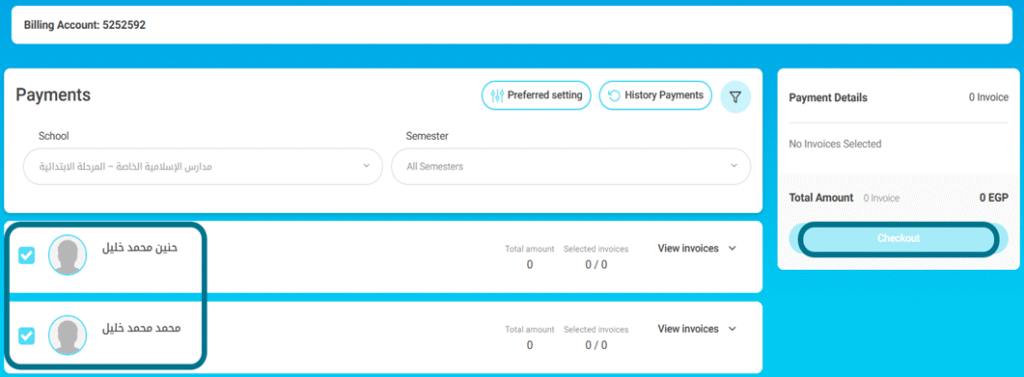
- System displays Family Payment Page.
- Default filters auto selected: All Children, Current Year, Current Semester.
- System fetches invoice data and summary
- Guardian views the invoice table & selects one or more invoices.
- Summary section updates: Total Paid, Due, Discount, Tax, Grand Total.
- Guardian clicks “Proceed to Payment”.
- Payment checkout with invoice IDs.
- Payment success
How to Use:
- Only children from the same school can be grouped into a single payment session.
- If children belong to different schools, the family payment feature is disabled.
- Payment is only allowed for visible and selected invoices.
2-Sick Leaves in the Approvals Flow #
Aim:
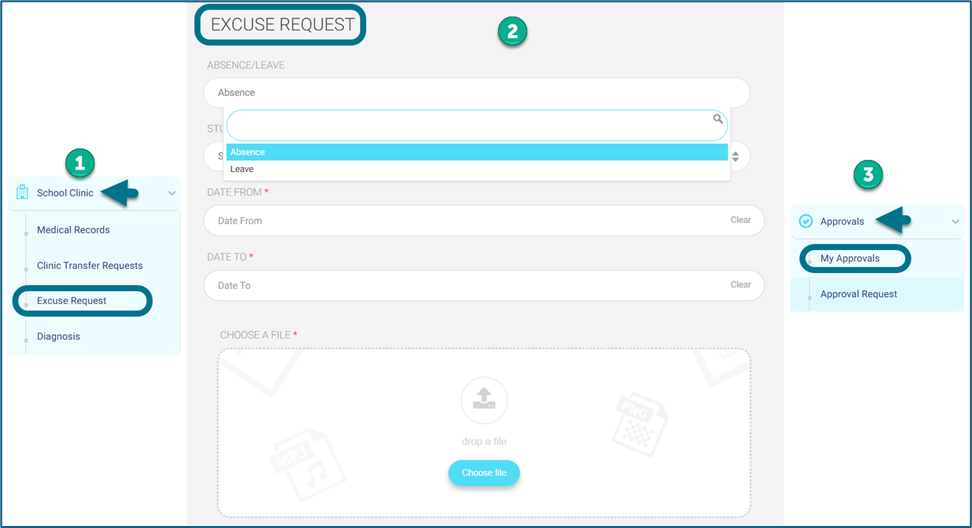
As a guardian, I need to be able to request a sick leave or excuserequest and to get them approved through the approvals flow module.
Access Path:
- admin’s account — side menu — settings — approval flows — add new flow.
- guardian’s account — side menu — clinic — Excuse Request will be added to their accounts.
- guardian’s account— side menu “Approvals” tab should be added to the guardian’s account which containing both “My Approvals” and “Approval Request” so they can follow their approvals.
How to Use:
We will use the approvals flow module for this change.
- admin’s account — side menu — settings — approval flows — add new flow.
- The admin will be able to choose some roles for the maker and checker and super checker.
We will have some changes regarding the medical module, as follows:
- So, for any maker role, the currently page called “Excuse Request” existing on the guardian’s account — side menu — clinic — Excuse Request will be added to their accounts.
- Secondly, on the mentioned “Excused Request” page, a new field will be added.
- This field will be called “Absence/Leave” and it will return two values:
- Absence.
- Leave.
- Also, guardians will be able to choose leave time.
- After that, it will go through the normal approvals flow.
- So, an “Approvals” tab should be added to the guardian’s account which containing both “My Approvals” and “Approval Request” so they can follow their approvals.
- Note: This will affect the attendance status of the student, and it will be changed to “Left with Permission (LP)”.
3-School Data Filtering on Payment History (Performance Boost)
Aim:
We added School-level data filtering to the Payment History page, so queries are scoped to the selected school (and optional sub-filters), significantly improving load time and responsiveness for large datasets.
Access Path:
LMS — Parent Account — Payments /Payment History.
How to Use:
From LMS — Parent Account — Payments /Payment History.
Click to see the transactions history of old semesters payments.