Skip to content
| User Manuals
| User Manuals

en_US English
en_US English ar Arabic fr_FR French

| User Manuals
| User Manuals
Popular Search reportBehaviorreport cardالمالت

Teacher Account

  • Logging in to the Platform 
  • Professional Development Hub
    • Intel’s Skills for Innovation
  • Motivation
    • The New Way of Learning
    • C-Inspire
    • My Score
  • Important Links
    • Important Links 
  • Home Page
    • Homepage
    • Personal Menu
    • PUBLIC PROFILE 
    • Edit Profile
    • Chat
    • Clubs Courses
  • Show all courses
    • COURSES
      • Charts and Behavior Analysis
      • Tab 1
        • Excel Sheet Grades Import
        • Manage Students Groups
        • Managing Content
        • Lecture Management
        • Grade Management edit –
        • Students List
        • Students’ Report Summary
      • Tab 2
        • Course Materials
        • Video Lectures
      • Tab 3
        • In-Class Activity
        • Assignments, Exams
        • Assignment Actions
        • Assignment Sections
        • Assignment Questions
        • Exams
        • Exam Styles
        • Exam Sections
        • Assignment settings
        • Exam Settings
        • Exam Settings | More options
      • Tab 4
        • Digital Libraries
        • Weekly Study Plan
        • Semester Plan
        • Course Preparations
      • Tab 5
        • Management of Timetable 
  • Books
    • Books
  • Activities
    • Summer Clubs
    • Contests
  • Classroom Attention Indicator
    • Classroom Attention Indicator –
  • Training Courses
    • Adding Trainees
  • Mailbox
    • Sent Messages
    • Draft Messages
    • Archived Messages
    • Compose
    • Trash
  • Appointments
    • Appointment Scheduling
    • Reserve Appointment
    • Appointments 
  • Grade Management
    • Grade Management
  • Discussions
    • Discussion Rooms
    • Discussion Rooms Main Page
    • Adding New Discussion Rooms
    • Adding New Posts
    • Comments Management
  • Central Exam Report
    • Central Exam Report
  • Questions Banks
    • Add Questions from Q-Banks
    • Exam Questions
    • Add Bulk Questions
  • My Schedule
    • Schedule
    • Exams Schedule
    • Calendar
      • Calendar
      • Editing Events
      • Adding Events
  • Virtual Classes
    • Virtual Classrooms
    • MS Teams Classroom
      • Adding Virtual Classrooms Using MS Teams
      • Using MS Teams Web Application
      • Joining the Classroom
      • MS Teams Classroom Main Screen
      • Manage Permissions
      • Classroom Participants
      • Classroom Conversation
      • Share Screen
      • More Actions
      • Meeting Info
    • Zoom Classrooms
      • Zoom Classroom Main Screen
      • Adding New Zoom Meeting Rooms
  • teacher Library
    • PUBLIC LIBRARY
    • VIRTUAL LABS 
    • My Files
  • Absence Report
    • Absence Report
  • E-Portfolios
    • E-Portfolios
    • Adding E-Portfolios
    • Editing E-Portfolios
    • Viewing EPortfolios
    • Reviewing Students E-Portfolios
    • Previewing Your Public Portfolios
  • Certificates | Letters
    • Issued Certificates | Letters
    • Certificates | Letters
    • My Certificates
    • Sign Multiple Certificates
    • My Letters
    • Issue Certificates
  • Parents student's requests
    • Parents students requests
  • Contents Reports
    • Contents Reports
  • Education Partners
    • Education Partners
  • My Behaviors
    • My Behaviors
  • Evaluation Tools
    • Forms
    • Evaluations | Surveys
  • Share Your Ideas
    • Share Your Ideas
  • Intel’s Skills for Innovation
    • Intel’s Skills for Innovation

Parent account

  • Logging in to the Platform
  • C-Inspire Awards
    •  C-Inspire Awards
  • Important Links
    • Important Links –
  • Homepage
    • Student Accounts
    • Edit Profile
    • Personal Menu
    • Personal Profile
    • Homepage
  • Student Contracts
    • Student Contracts
  • Call Student
    • Call Student
  • Mailbox
    • Trash
    • Archived Messages
    • Compose
    • Sent Messages
  • Appointments
    • Reserve Appointment 
    • Appointments 
  • Public Library
    • Custom Library
    • My Files
    • All
  • C-Pay
    • CPay for Online Payments (KSA)
    • CPay for Online Payments (Egypt)
  • Personal Drivers
    • Personal Driver 
    • Link Drivers With Students
    • Students Drivers List
  • Share Your Ideas
    • Share Your Ideas
  • Canteens
    • Delivered Orders
    • Canteens
  • Events
    • Events
  • Contests & Activities
    • Contests & Activities
  • Virtual Meetings
    • Virtual Meetings
  • Training Courses
    • Training Courses
  • School Clinic
    • Medical Records
    • Clinic Transfer Requests/ Diagnosis
  • Education Partners
    • Education Partners
  • Bus Trips 
    • Bus Trips 
  • Evaluations | Surveys
    • Forms
    • Evaluations | Surveys
  • Admission Exams Schedules
    • Admission Exams Schedules

Student account

  • Logging in to the Platform
  •  Awards and Scores
    • The New Way of Learning
    • C-Inspire
    • My Score
    • My Awards
  • Important Links
    • Important Links
  • Home Page
    • Homepage
    • Personal Menu
    • Personal Profile
    • Edit Profile
    • Chat
  • Courses
    • Clubs Courses
    • Courses—
    • Course Materials
    • Video Lectures
    • Discussion Rooms
    • Online Assignments 
    • Exams
    • Training Courses 
  • Previous Course Contents
    • Previous Course Contents
  • Book
    • books
  • My Schedule
    • Elective Subject
    • Schedule Journal
    • Schedule
    • Weekly Study Plan
    • Exam Schedule 
    • Calendar
      • Calendar
      • Adding Events
      • Editing Events
  • Digital Library
    • Digital Library 
    • Courses Library
    • Public Library
    • Custom Libraries
    • Virtual Labs 
    • My files
  • Evaluation Tools
    • Evaluation
    • form
  • Virtual Classes
    • Virtual Classrooms
    • MS Teams Classroom
      • Background Effects
      • Joining Classrooms Using MS Teams Desktop Application
      • Joining Classrooms Using MS Teams Web Application
      • Viewing Old Smart Classrooms (Recorded)
      • MS Teams Classroom Main Screen
      • MS Teams Classroom Main Screen
      • Choosing Your Video and Audio Options
      • Classroom Participants
      • Share Screen
      • Background Effects
      • Meeting Info
      • Classroom Conversation
      • More Actions
      • Meeting Notes
    • Zoom Meeting
      • Joining Zoom Virtual Classrooms
      • Joining Classrooms Using Zoom Application
      • Zoom Classroom Main Screen
  • Education Partners
    • Education Partners
  • Contests
    • Contests
  • canteens
    • School Canteen/Restaurant 
  • Mailbox
    • Draft Messages
    • Mailbox
    • Compose
    • Inbox
    • Sent Messages
    • Archived Messages
    • Trash
  • Attendance
    • Daily Lateness
    • Course Absences
    • Daily Absences
    • Course Absences Summary
    • Course Lateness
    • Absences Summary
  • Certificates | Letters
    • Certificates | Letters
  • My Profile
    • E-Portfolios
    • Adding E-Portfolios
    • Editing E-Portfolios
    • Viewing E-Portfolios
    • Previewing Your Public Portfolios
  • Bus Trips
    • Bus Trips
  • Other Services
    • Share Your Ideas 
  • Canteens
    •  Canteens
  • Contents Reports
    • Contents Reports

School Accountant

  • Add Expiry Date to a Financial Claim
  • Claims Report
  • Logging in to the Platform 
  • CPay Installment Plans Facility
  • CPay Finance Requests

Teacher Supervisor Account

  • Logging in to the Platform
  • Homepage
    • Homepage
    • Personal Menu
    • Edit profile
    • PUBLIC PROFILE 
  • Contents Reports
    • Contents Reports
  • Appointments
    • Reserve Appointment
    • Appointments 
  • Behaviors Report
    • Behaviors Report
  • Calendar
    • Calendar
    • Editing Events
    • Adding Events
  • Certificates | Letters
    • Issue Certificates
    • Certificates | Letters
    • My Letters
    • My Certificates
    • Issued Certificates | Letters
  • Class Visits
    • Copy from Template
    • Adding New Class Visits
    • Class Visits
  • Contests
    • Contests
  • Education Partners
    • Education Partners
  • EPortfolios
    • Previewing Your Public Portfolios
    • Viewing EPortfolios
    • Editing EPortfolios
    • Adding E-Portfolios
    • EPortfolios
  • Evaluations | Surveys
    • Forms
    • Evaluation | Surveys
  • Grade Management
    • Insertions Report
    • Combined Reports
    • Analysis
    • Grade Management
  • Mailbox
    • Compose
    • Trash
    • Archived Messages
    • Mailbox
    • Sent Messages
  • Management Reports
    • Management Reports
  • Public Library
    • Public Library/Digital Content
  • Questions Banks
    • Questions Banks
  • Share Your Ideas
    • Share Your Ideas
  • SMS
    • SMS
  • Teachers list
    • Exams/Homework Without Questions
    • Teachers’ List
  • Training Courses
    • Training Courses
  • Virtual Classrooms
    • Adding Users to Meetings
    • Joining Zoom Virtual Meeting Rooms
    • Adding New Zoom Meeting Rooms
    • Zoom Meeting Room Main Screen
    • Virtual Meetings
    • Upcoming Smart Classes
    • MS Teams Meeting Room Main Screen
    • Joining MS Teams Meeting Rooms
    • Adding Virtual Meetings Using MS Teams
    • All Smart Classes
    • Recorded Smart Classes
    • Virtual Classrooms
  • Weekly Plan
    • Weekly Plan
  • C-Inspire Awards
    • C-Inspire Awards
  • chat
    • Chat
  • Question Banks
    • Question Banks
  • Teachers' Statistics
    • Teachers’ Statistics
  • Teachers' Attendance Report
    • Teachers’ Attendance Report
  • Central Exams Comprehensive Report
    • Central Exams Comprehensive Report

Administrator Account

  • LOGGING IN TO platform
  • Dashboard/Realtime Overview
    • Teachers Attendance Report
    • Teachers’ Preparations Report
    • Students’ Scores
    • Most Active Teachers in the Group
    • Online Users
    • Dashboard/Realtime Overview
  • C-Inspire Awards
    •  C-Inspire Awards
  • important links
    • IMPORTANT LINKS 
  • Homepage
    • Edit Profile
    • Personal Menu
    • Homepage
    • Public Profile 
  • Support / Request
    • Transfer All School Guardians
    • Activation Ticket Resolution Report
    • Transfer Student
    • Fix Score
    • User Information
    • Guardian Transfer
    • New Feature Requests
    • Contents Reports
    • LMS Support
    • Activation Ticket Resolution 
    • Internal Support
    • FAQs
  • Users
    • Manage Badge
    • Enhancements to User Management Filters
    • Users / Students
    • Student’s /Adding
    • Students Without Sections
    • Excel Import- Bulk Students
    • Update Student’s Status
    • Student / Action
    • More Actions
    • Guardians
    • Teachers
    • Teacher’s Statistics
    • Supervisors
    • Management
    • Management / Option
    • Kagan Coaches
  • Weekly Plan
    • Weekly Plan /Dynamic weekly
    • weekly plan / Static
  • Courses Management
    • Questions Banks
    • Schedule Journal
    • Courses Management
    • Courses
    • Adding Courses
    • Course Templates
    • Trees
    • Areas
    • Areas – Adding Criteria
    • Exams Schedule
    • Exams Mark Comparison
    • Full Schedule
    • lectures
      • Lectures/ Schedules 
      • Lectures – Students List
      • Adding Lectures
      • Lectures/Manage Halls and Manage Medals 
      • Alternative Teacher
      • Lectures
      • Managing Timeslots
      • Adding Bulk Lectures
  • Settings
    • Enable PDF Conversion
    • Closure Management
    • Approval Flows
    • System Settings
    • Settings /part one
    • System Settings – part Two
    • System Settings / part three
    • System Settings—Part Four
    • Stages
    • Years
    • Years/Adding a Semester Plan
    • Years – Copy to Semester
    • Review Students E-Portfolios
    • E-Portfolios
  • Registration
    • Registration Settings
    • Registration Forms
  • Behaviors & Advising
    • Behaviors Report
    • Behavior Degree
    • Advising Programs
    • Behavior Actions
    • Behavior Groups
    • Behaviors
  • Calendar
    • Adding Tasks to Calendar
    • Editing Events
    • Adding Events
    • Calendar
  • Mailbox
    • Archived Messages
    • Inbox
    • Trash
    • Sent Messages
    • Compose
  • Appointments
    • Reserve Appointment
    • Appointments 
  • Announcements
    • Announcements
  • Report
    • Training Courses Report
    • EduMall Products Report
    • EduMall Purchases Report
    • Custom Reports
    • Reports
    • Management Reports
    • Admissions Request Report
    • C-Inspire Reports
    • Redemption Statistics
    • Schools: C-Inspire Report
    • Students Badge Report
    • Medals Report
    • Files Log
    • School Group Absences
    • Full Day Absences Detailed Report
    • Lectures Absences Detailed Report
    • Export User Accounts
    • Activity Log
    • Messages Log
    • Score Drop
    • Staff Behavior Report
    • VCR Activation Report
    • Modules Activation Report
    • Financial Claims Report
    • Students Accounts Log
  • Grade Management
    • Mark Scheme Analysis
    • Lectures/ Schedules 
    • Grade Report Comparison 
    • Equations
    • Central Exam Report
    • More Action
    • Show student grade
    • Report card / Action
    • Grade Management
  • Training Courses
    • Courses Status
    • Training Courses Schedule
    • Training Courses
    • School Locations
    • Training Courses Definition
    • My Training Courses
  • SMS
    • Send SMS from Excel
    • SMS Templates
    • Sending SMS
    • SMS
  • Certificates | Letters
    • Certificates | Letters
  • Forms and Assessments
    • Forms and Assessments
    • Forms
    • Evaluations
    • Assessments
  • Virtual Classrooms
    • Manage Users
    • Adding Virtual Meetings Using MS Teams
    • Adding New Zoom Meeting Rooms
    • Virtual Classrooms
  • Education Partners
    • Education Partners
  • Education Partners Setup
    • Customize Schools Education Partners
    • Education Partners Setup
  • Activities
    • contests
    • Summer Clubs
  • Students requests settings
    • Requests log
    • Active requests
    • Students requests settings
  • School Clinics
    • School Clinic
    • Medical Records
    • Clinics Officers
    • Clinics
    • Diseases
    • Diagnoses List
    • Medication
    • Inoculations
  • Canteens
    • Creating Canteens
    • Assign Users /Restaurant Report  
  • SHARE YOUR IDEAS
    • Share Your Ideas
  • Bus Tracking 
    • Export Bus Cards
    • Bus Supervisors
    • Trips
    • Bus Tracking 
  • Public library
    • Custom Libraries

Manager Account

  • Logging in To platform
  • C-Inspire Awards
    • C-Inspire Awards 
  • Important Links
    • Important Links 
  • Homepage
    • Homepage
    • Personal Menu
    • Personal Profile
    • Edit Profile
    • Realtime Overview
    • Students’ Scores
    • Teachers’ Attendance Report
    • Teachers’ Preparations Report
  • Students
    • Daily Lateness
    • Daily Absences
    • Students’ Numbers Report
    • Registration Approval
    • Absences and Behaviors Reports
    • Students
  • Teachers
    • Daily Absences
    • Conditional Course Absences Summary
    • Course Absences Summary
    • Course Absences
    • Lectures Absences
    • School Schedule
    • Teachers Timeslots
    • Workload Report
    • Teachers
  • Guardians
    • Parents/Guardians
  • Messages Log
    • Messages Log
  • Class Visits
    • Class Visits
    • Adding New Class Visits
    • Copy from Template
  • Advising Programs
    • Advising Programs
  • Absences
    • Full Day Absences Detailed Report
    • Lectures Absences Detailed Report
  • Announcements
    • Announcement
    • Add Announcements
  • Stages
    • Stages
  • Report Cards
    • Report Cards
  • Mailbox
    • Archived Messages
    • Trash
    • Sent Messages
    • Mailbox –
    • Inbox –
    • Compose
    • Draft Messages
  • Calendar
    • Select Calendar Owner
    • Adding Tasks to Calendar
    • Editing Events
    • Adding Events
    • Calendar
  • Appointments
    • Reserve Appointment
    • My Appointments
  • SMS
    • Recharge Balance
    • Send SMS from Excel
    • Send SMS
    • SMS Report
  • Management Reports
    • Management Reports
  • VCR Activation Report
    • VCR Activation Report
  • My Schedule
    • Weekly Plan
    • Exams Schedule
  • Public Library
    • My Files
    • Custom Libraries
    • Public Library (All)
  • Evaluations | Surveys
    • Evaluation stages report
    • Adding Surveys
    • Evaluations and Surveys
  • Forms
    • Forms
  • Certificates | Letters
    • Create New Templates
    • Manage Layouts
    • Create New Layout
    • My Signature
    • My Letters
    • My Certificates
    • Manage Templates
    • Issue Certificates | Letters
    • Certificates | Letters
  • E-portfolios 
    • Adding E-Portfolios
    • E-portfolios 
  • Virtual Classrooms
    • Virtual Meetings
      • Virtual Meetings
      • Virtual Meetings
        • MS Teams
          • MS Teams Meeting Room Main Screen
          • Joining MS Teams Meeting Rooms
          • Adding Virtual Meetings Using MS Teams
        • Zoom Meeting
          • Zoom Meeting Room Main Screen
          • Adding New Zoom Meeting Rooms
          • Joining Zoom Virtual Meeting Room
  • School Clinic
    • Medical Records
    • Clinic Transfer Requests
    • School Clinic
  • Contents Reports
    • Contents Reports
  • Education Partners
    • Education Partners
  • Contests
    • Contests
  • School Clubs
    • School Clubs
  • parents students requests
    • Parents student’s requests
  • Behavior Degree
    • Behavior Degree
  • Staff Behaviors
    • Staff Behaviors
  • staff Behavior report
    • Staff Behavior Report
  • Human Resources
    • Human Resources
  • School Invoices
    • School Invoices
  • Share Your Ideas
    • Share Your Ideas
  • Behaviors Report
    • Behaviors Report
  • Statistics
    • Communication Statistics
  • Activation Reports
    • Activation Reports
  • Stats
    • General Statistics
    • Stats
    • Statistics with Interaction
  • Training Courses
    • Training Courses
  • Accr. Evidences pool
    • Accr. Evidence Pool
  • Full Schedule
    • Full Schedule
  • My Approvals
    • Approval Review
    • My Approvals

Adviser Account

  • Logging in to the Platform 
  • Main Menu
    • Main screen
    • Edit profile
    • Personal Profile
  • HOME
    • Preview your public portfolios
    • EPortfolios
    • Chat
  • C-Inspire Awards
    • C-Inspire
  • Important Links
    • Important Links
  • Students List
    • Conditional Courses Absences
    • VCR Activation Report
    • Behaviors Report
    • Student Affairs Summary
    • Full day Absences Detailed Report
    • Student list
    • Course Absences Summary
    • Absences Summary
    • Course Absences
    • Daily Absences
    • Students List
  • Parents List
    • Parents List
  • Calendar
    • Edit Event
    • Adding Event
    • Calendar
  • Advising Programs
    • Advising Programs
  • Full Schedule
    • Full Schedule
  • Schedule Journal Requests
    • Schedule Journal Requests
  • Mailbox
    • Inbox
    • Draft Messages
    • compose
    • Trash
    •  Sent Messages
  • Appointments
    • Appointments 
    • Reserve Appointment
  • Send SMS
    • Send SMS from Excel
    • SMS Report
    • Send SMS
  • Announcements
    • Add Announcements
    • Announcements
  • Public Library
    • Public Library (All)
    • Custom Libraries
  • Training Courses
    • Training Courses
  • Certificates | Letters
    • Issue Certificates
    • My Letters
    • My Certificates
    • Certificates | Letters
  • School Clinic
    • Medical Records
    • Diagnosis
    • Clinic Transfer Requests
    • School Clinic
  • Virtual Meetings
    • Virtual meetings control
    • Add new Zoom meeting room
    • Select virtual meeting vendor
    • Virtual Meetings
  • Virtual Classrooms
    • Add users to the meeting
    • Manage users
    • Teams vendor
    • Choose vendor
    • Add new Teams meeting room
    • Zoom vendor
  • Management Reports
    • Management Reports
  • Contents Reports
    • Contents Reports
  • Education Partners
    • Education Partners
  • Evaluations | Surveys
    • Evaluations | Surveys
  • Forms
    • Forms
  • Contests
    • Contests
  • Summer CLUBS
    • School Clubs
  • Parents student's requests
    • Parents students requests
  • Behavior Degree
    • Behavior Degree
  • Human Resources
    • Human Resources
  • Share Your Ideas
    • Share Your Ideas

Activity Officer

  • Logging in to the Platform 
  • Announcements
    • Announcements
  • Appointments
    • Appointments
  • C-Inspire Awards
    • C-Inspire Awards
  • Calendar
    • Select Calendar Owner
    • Adding Tasks to Calendar
    • Add Events
    • Calendar
  • Contests & Activities
    • Contests & Activities
  • Discussions
    • Discussions
  • Full Schedule
    • Full Schedule
  • Human Resources
    • Human Resources
  • Important Links
    • Important Links
  • Mailbox
    •  Sent Messages
    • Inbox Options:
    • Trash
    • Archived Messages
    • Draft Messages
    • Compose
    • Mailbox
  • My Card
    • My Card
  • Public Library
    • Public Library (All)
  • Share Your Ideas
    • Share Your Ideas
  • SMS
    • SMS Report
    • Send SMS
  • Students List
    • Students List
  • Summer Clubs
    • Summer Clubs
  • Virtual Meetings
    • Adding a New Zoom Meeting Room
    • Adding MS Teams Virtual Meeting
    • Virtual Meetings

floor supervisor

  • Logging in to the Platform 
  • Absences
    • Teachers Attendance Report
    • Full Day Absences Detailed Report
  • C-Inspire Awards
    •  C-Inspire Awards
  • Google Drive
    • Google Drive
  • Important Links
    • Important Links
  • Public Library
    • Public Library
  • Students List
    • Students List
  • Training Courses
    • Training Courses
  • Announcements
    • Announcements
  • Send SMS
    • SMS Report
    • Send SMS
  • Evaluations | Surveys
    • Evaluations | Surveys
  • Mailbox
    • Inbox
    • Trash
    • Sent Messages
    • Archived Messages
    • Draft Messages
    • Compose
    • Mailbox
  • My Card
    • My Card
  • My Schedule
    • My Schedule
  • School Clinic
    • School Clinic
  • Share Your Ideas
    • Share Your Ideas
  • Virtual Classrooms
    • Virtual Classrooms
  • Virtual Meetings
    • Virtual Meetings
  • Contests
    • Contests
  • Education Partners
    • Education Partners
  • Human Resources
    • Human Resources
  • Students requests
    • Students requests

Exam supervisor

  • Logging in to the Platform 
  • Central Exams
    • Central Exams
  • Education Partners
    •  Education Partners
  • Mailbox
    • Compose
    • Inbox
    • Trash
    • Sent Messages
    • Archived Messages
    • Draft Messages
    • Mailbox
  • Questions Banks
    • Questions Banks
  • Share Your Ideas
    • Share Your Ideas

Bus Supervisor

  • Logging in to the Platform 
  • Home
    • Home
  • Important Links
    • Important Links
  • Mailbox
    • Inbox
    • Trash
    • Sent Messages
    • Archived Messages
    • Draft Messages
    • Mailbox
    • Compose
  • Share Your Ideas
    • Share Your Ideas
  • Trips
    • Today Trips
    • Trips

Canteen Officer

  • Logging in to the Platform 
  • Canteen Settings
    • Canteen Settings
  • Mailbox
    •  Sent Messages
    • Compose
    • Inbox
    • Trash
    • Archived Messages
    • Draft Messages
    • Mailbox
  • Purchase at Canteen
    • Orders
    • Purchase at Canteen
  • Appointments
    • Reserve Appointment
    • Appointments
  • Share Your Ideas
    • Share Your Ideas

Clinic Officer

  • Update Chronic Diseases
  • Logging in to the Platform 
  • Important Links
    • Important Links
  • Home
    • Home
  • Diagnosis
    • Diagnosis Types List
    • Emergency cases
    • Diagnosis
  • Diseases and Medications
    • Inoculations
    • Medications
    • Diseases
  • Appointments
    • Reserve Appointments
    • Appointments
  • Mailbox
    • Compose
    • Inbox
    • Trash
    • Sent Messages
    • Archived Messages
    • Draft Messages
    • Mailbox
  • Medical Records
    • Medical Records
  • Share Your Ideas
    • Share Your Ideas
  • SMS Report
    • SMS Report
  • Students
    • Creating a New Medical Record
    • Students
  • Purchase Report
    • Purchase Report

Control Admin

  • Logging in to the Platform 
  • Committees Management
    • Committees Summary
    • Committee Management
  • Important Links
    • Important Links
  • Mailbox
    • Compose
    • Inbox
    • Trash
    • Archived Messages
    • Draft Messages
    • Sent Messages
    • Mailbox

admission Account

  • Students ePortfolios
  • Logging in to the Platform 
  • Registration Approval
    • Registration Approval
  • Admissions Request Reports
    • Admissions Request Reports
  • Students List
    • Students List
  • Student Contracts
    • Student Contracts
  • Messages
    • Mailbox
    • Draft Messages
    • Trash
    • Archived Messages
    • Compose
    • Inbox
    • Sent Messages
  • SMS
    • send SMS
    • SMS Report
    • Send SMS from Excel
  • Appointments
    • Reserve Appointment
    • Appointments
  • Admission Exams
    • Admission Exams
  • Registration Events
    • Registration Events
  • Registration
    • Registration Settings / More options
    • Registration Status Change Logs
    • Registration Settings
    • Registration Forms
  • My Card
    • My Card
  • Forms
    • Forms
  • Support / Request
    • Support / Request
  • Human Resources
    • Human Resources
  • Share Your Ideas
    • Share Your Ideas
  • Important Links 
    • Important Links 

system Updates

  • Classera V15 AI Updates 
  • Classera-15 Overview
  • system Updates September 2024
  • Classera Updates | Feb – Apr 2025
    • Various Reports
    • Account Clinic officer
    • Account Admission officer
    • Account Parent / student
    • Account Admin
    • Account Teacher
  • System Update| September 2025
    • Guardian
    • Bus Supervisor
    • Clinic Officer
    • supervisor Account
    • Accountant Account
    • Manger Account
    • Admission Officer
    • Teacher Account
    • Admin Account
  • System Update December -2025
    • Exam Supervisor.
    • Clinic Officer Account.
    • Bus Supervisor Account.
    • Teacher Account.
    • Admission Officer Account.
    • Guardian Account.
    • Accountant Account.
    • Teacher Supervisor Account.
    • Manager Account
    • Floor Supervisor Account
    • Admin Account
  • System Updates | Jan– Mar 2026
    • Admin Account
    • Teacher Account
    • Teacher Supervisor Account
    • Floor Supervisor Account
    • Admission Officer Account

School Owner

  • E-Portfolios
    •  E-portfolios 
  • important links
    • Important Links 
  • Calendar
    • Calendar
  • Homepage
    • chat
    • Edit Profile
    • Public Profile 
    • Personal Menu
  • Support / Request
    • Classera Support
    • New Feature Requests
    • FAQs
  • Mailbox
    • Trash
    • Archived Messages
    • Draft Messages
    •  Sent Messages
    • Compose
  • Users
    • Management
    • Supervisors
    • Guardians
    • Teachers
    • Students
  • SMS
    • SMS Report
    • Send SMS from Excel
    • Send SMS
  • Report
    • EduMall Products Report
    • EduMall Purchases Report
    • VCR Activation Report
    • Files Log
    • Messages Log
    • Activity Log
    • Lectures absences detailed report
    • Absences detailed report
    • Activation Reports (Beta)
    • Management Reports
    • Approvals
      • Approval Request
      • My Approvals
  • Survey and Forms
    • Forms
    • My Evaluation
    • Evaluations
  • Virtual Classrooms
    • All Smart Classes
    • Recorded Smart Classes
    • Upcoming Smart Classes
    • Virtual Meetings
  • Education Partners
    • Education Partners
  • Success Partners
    •  Success Partners
  • Appointment
    • My Appointments
    • Reserve Appointment
View Categories
  • Home
  • Docs
  • Administrator Account
  • Settings
  • System Settings / part three

System Settings / part three

GRADUATED STUDENTS’ SETTINGS  #

This tool allows enabling/disabling graduated students from logging in while the secondary stage is ongoing in the school. The toggle button is closed to prevent graduated students from logging in based on the school’s instructions. 

ANNOUNCEMENTS SETTINGS  #

Through the toggle button Allow the manager to modify the announcements It can be enabled or disabled based on the school’s decisions, granting the system administrator the authority to control advertisements by users. 

LESSON PREPARATIONS & WEEKLY STUDY PLAN SETTING  #
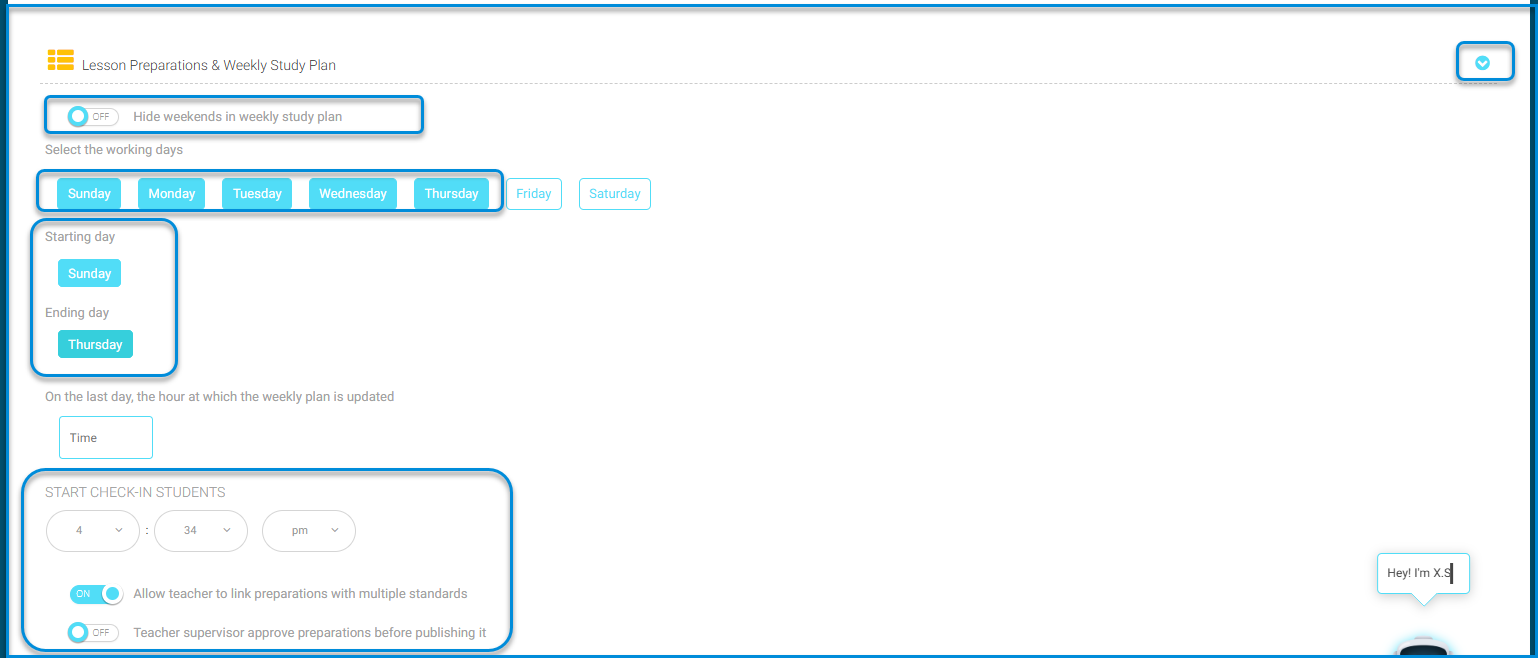
This tool allows users to control lesson preparation settings and the weekly lesson plan by users: 

  • Toggle Button to Hide weekends in weekly study plan: When disabled it hides the weekend days according to the school’s system. Consequently, the system displays the start and end days of the school week. 
  • Setting the Time for Renewing the Weekly Plan: Users can specify the time for renewing and inserting the weekly plan into their designated box based on the school’s instructions. 
  • Toggle Button to Allow Teachers to Link Preparation with Multiple Standards: When activated, it permits teachers to link their preparation to multiple standards, serving as a significant tool for users to connect the standards. 
  • Toggle Button for Teacher supervisor approve preparations before publishing it: This button allows/disallows teachers to publish their preparation immediately upon entry. By activating this button, the teacher supervisor can control whether the preparation is published or not. 
PUBLIC PROFILES SETTINGS  #

These settings allow control over user files: 

  • Toggle Button to Allow Public Profiles: When activated, it allows sharing user files from within the school or outside the system. 
  • Toggle Button to Allow students upload EPortfolios without checkup: This controls whether students can upload achievement files without teacher review. It can also be disabled to require teacher review before uploading. 
SMART CLASSES SETTINGS  #
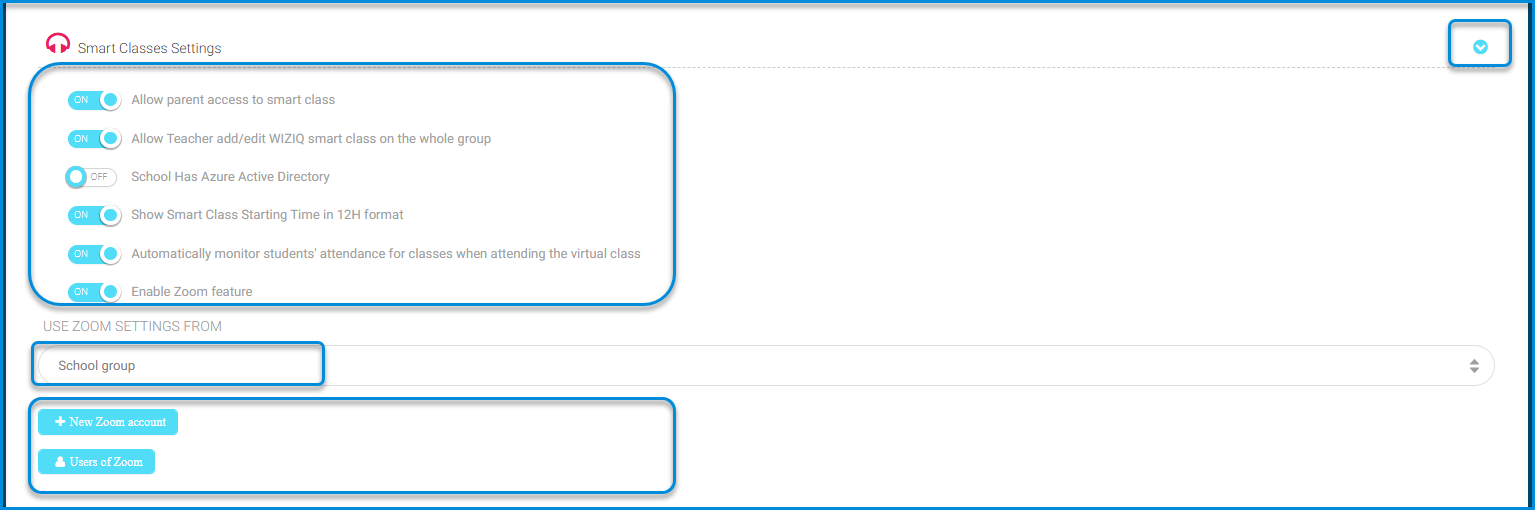
These settings allow for the customization of smart classroom settings through control over the following toggle buttons: 

  • Toggle Button to Allow parent access to smart class: Activated based on the school’s need for parents to access smart classrooms. 
  • Toggle Button to Allow Teacher add/edit WIZIQ smart class on the whole group. 
  • Toggle Button to Show Smart Class Starting Time in 12H format: Enabled to specify the start time of the smart classroom in 12-hour format. 
  • Toggle Button to Automatically monitor students’ attendance for classes when attending the virtual class: Activated to automatically monitor student attendance when they join the smart classroom, facilitating student assessment and tracking attendance. 
  • Enable Zoom feature: Also, the Zoom service for smart classrooms can be activated based on the school’s instructions. 
  • Click on the Dropdown Menu to Use Zoom Settings: This allows selecting the administrator responsible for the Zoom settings based on the school’s instructions. 
ABSENCE SETTINGS  #

This tool provides control over available options for managing absences, such as sending notifications or applying specific absenteeism policies, and is managed through the following toggle buttons: 

  • Toggle Button for Students Daily Absence Notifications: Activating this sends notifications to alert teachers or students when a student is absent from class for a certain period of time. 
  • Toggle Button for Students Lectures Absence Notifications: This enables notifications to alert teachers or students when a student is absent from a lesson for a certain period of time. 
  • Toggle Button for Student Absence Letters: Activating this sends messages to parents or students themselves to inform them of student absences from classes. 
DISCUSSION ROOMS SETTING  #

Through these settings, options and controls that can be customized in the virtual discussion or chat environment are explained to us. These settings include allowing the following: 

  • Toggle Button for Allow Discussion Rooms: This allows administrators in the educational or administrative environment to enable or disable the ability to create discussion rooms for users. When this button is activated, users can create discussion rooms and start conversations. However, when it is disabled, users are prevented from creating discussion rooms and participating in them. 
  • Toggle Button for Allow Students Create Discussion: This allows teachers or administrators in the educational environment to enable or disable the ability for students to create discussion rooms. When this button is activated, students can create discussion rooms and interact with each other. However, when it is disabled, students cannot create rooms or participate in discussions without permission from teachers or supervisors based on the educational institution’s instructions. 
  • Toggle Button Allow Students to Create Topics in Discussion: This allows teachers to enable or disable the ability for students to create new topics in discussion rooms. 

Note: The maximum allowed number of responses by students in discussion rooms can be controlled and included. 

REPORT CARDS SETTINGS  #

The system allows us to specify the options that can be customized in the educational system for creating grade reports, such as the “GPA system used.” This refers to the adopted system for calculating students’ cumulative grade point average (GPA), which determines how student grades are converted into points or averages to assess their academic performance comprehensively according to the educational institution and its educational system. 

MESSAGES SETTINGS  #
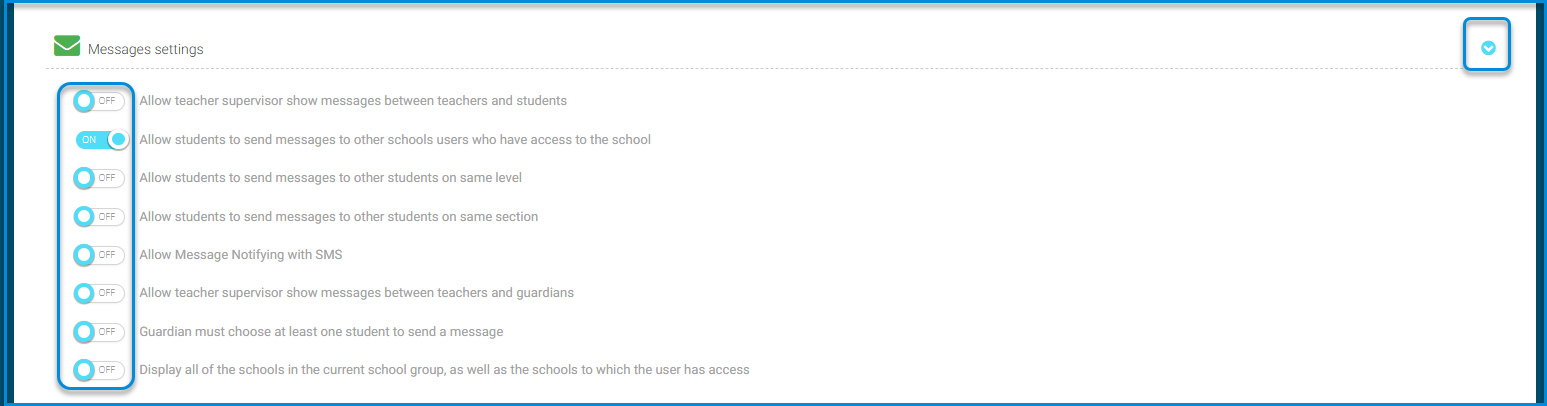
The settings are activated through control over the following toggle buttons: 

  • Toggle Button to Allow teacher supervisor show messages between teachers and students: This option allows teacher supervisors to enable or disable the visibility of messages exchanged between teachers and guardians. It enables them to monitor communication and interaction between them. 
  • Toggle Button for Allow students to send messages to other school’s users who have access to the school: This option permits or restricts students from sending messages to users from other schools, as long as those users have authorization over the school. 
  • Toggle Button for Allow students to send messages to other students on same level: Enabling this option allows students to send messages to other students who are in the same educational level. 
  • Toggle Button for Allow students to send messages to other students on same section: When activated, this allows students to send messages to their classmates in the same class or grade. 
  • Toggle Button for Allow Message Notifying with SMS: This feature enables message notification through Short Message Service (SMS), where recipients receive messages directly on their mobile phones. 
  • Toggle Button for Allow teacher supervisor show messages between teachers and guardians: This option is activated for the supervising teacher to view messages exchanged between teachers and guardians, allowing them to monitor communication and interact accordingly. 
  • Toggle Button for Guardian must choose at least one student to send a message: This condition mandates that guardians select at least one student as a recipient before sending a message, ensuring there is at least one recipient for the message based on the school’s instructions. 
  • Toggle Button for Display all of the schools in the current school group, as well as the schools to which the user has access. 
SMS SETTINGS  #
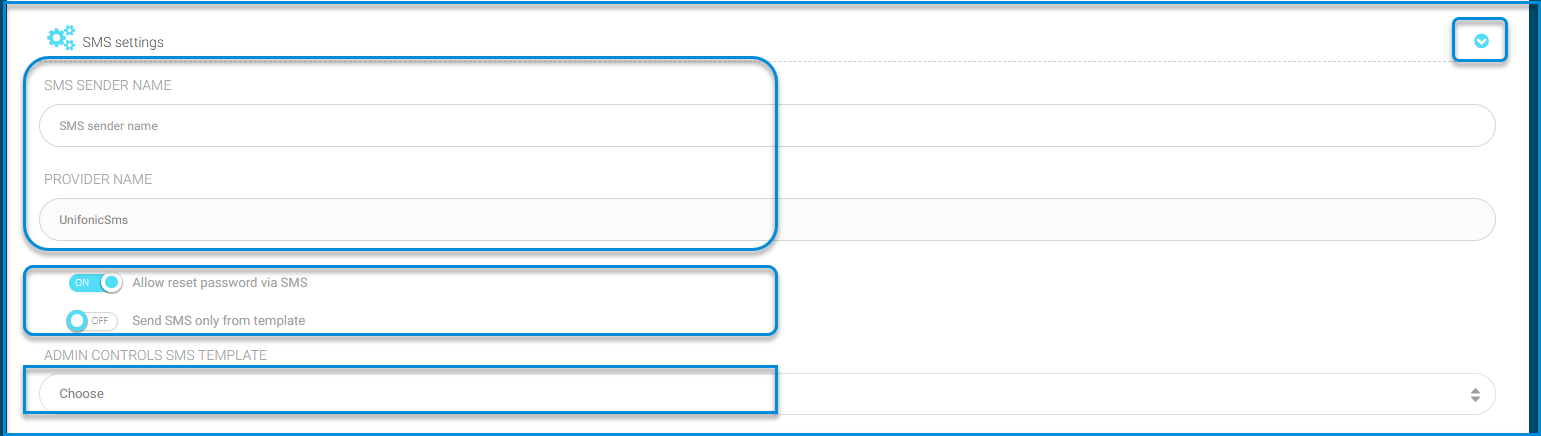
These settings allow customization of SMS options as follows: 

  • Toggle Button for Allow reset password via SMS: This option enables users to reset their passwords via SMS. Users can request a password reset and receive a verification code through SMS to confirm their identity and change their password. 
  • Toggle Button for Send SMS only from template: This setting specifies that only short messages from pre-defined templates can be sent. This makes the sending process more efficient and organized, as messages are selected from predefined templates to meet specific needs. 
FINGER PRINT SETTINGS  #
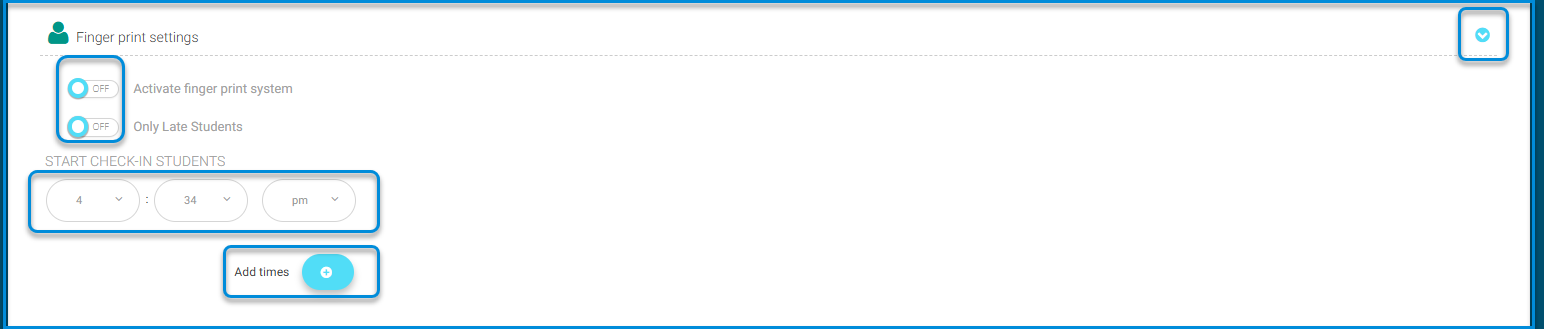
These settings allow customization and configuration of the fingerprint system, such as enabling or disabling it, adjusting time settings, and specifying target groups as follows: 

  • Toggle Button for Activate finger print system: This control manages the activation or deactivation of the fingerprint system according to the educational institution’s instructions to monitor the attendance of students arriving on time. 
  • Toggle Button for Only Late Students: This setting specifies that only fingerprints of students arriving at school after the specified time are recorded, without recording the attendance of students arriving on time. 
  • The specified time for student arrival can be set along with defining the start time for attendance recording. 
  • Click on the button to add specific fingerprinting times. 
  • Specify the start and end times and select the appropriate template for this schedule. 
EXAM MODE SETTING  #

This feature allows for specifying the test mode for both students and teachers on the platform through the following: 

  • Click on the toggle button Student Exam Mode based on the school’s needs and instructions. 
  • Click on the toggle button Teacher Exam Mode as per the school’s requirements. 
EXAM PRIVACY SETTING  #

This setting allows the teacher to control whether to hide or show the test to the administration by enabling or disabling the toggle button. 

CONTROL ADMIN  #

The school assigns an administrator responsible for activating the seat number and control number, and controlling the display of students’ exam cards through toggling

What are your Feelings

Share This Article :

  • Facebook
  • X
  • LinkedIn
  • Pinterest
System Settings – part TwoSystem Settings—Part Four
Table of Contents
  • GRADUATED STUDENTS’ SETTINGS 
  • ANNOUNCEMENTS SETTINGS 
  • LESSON PREPARATIONS & WEEKLY STUDY PLAN SETTING 
  • PUBLIC PROFILES SETTINGS 
  • SMART CLASSES SETTINGS 
  • ABSENCE SETTINGS 
  • DISCUSSION ROOMS SETTING 
  • REPORT CARDS SETTINGS 
  • MESSAGES SETTINGS 
  • SMS SETTINGS 
  • FINGER PRINT SETTINGS 
  • EXAM MODE SETTING 
  • EXAM PRIVACY SETTING 
  • CONTROL ADMIN